Linking Webhook in Project Creation Process
Step 1: When creating a project, choose Webhook as the data source
To provide the data via HTTP POST requests, select Webhook as a data source when creating a project.
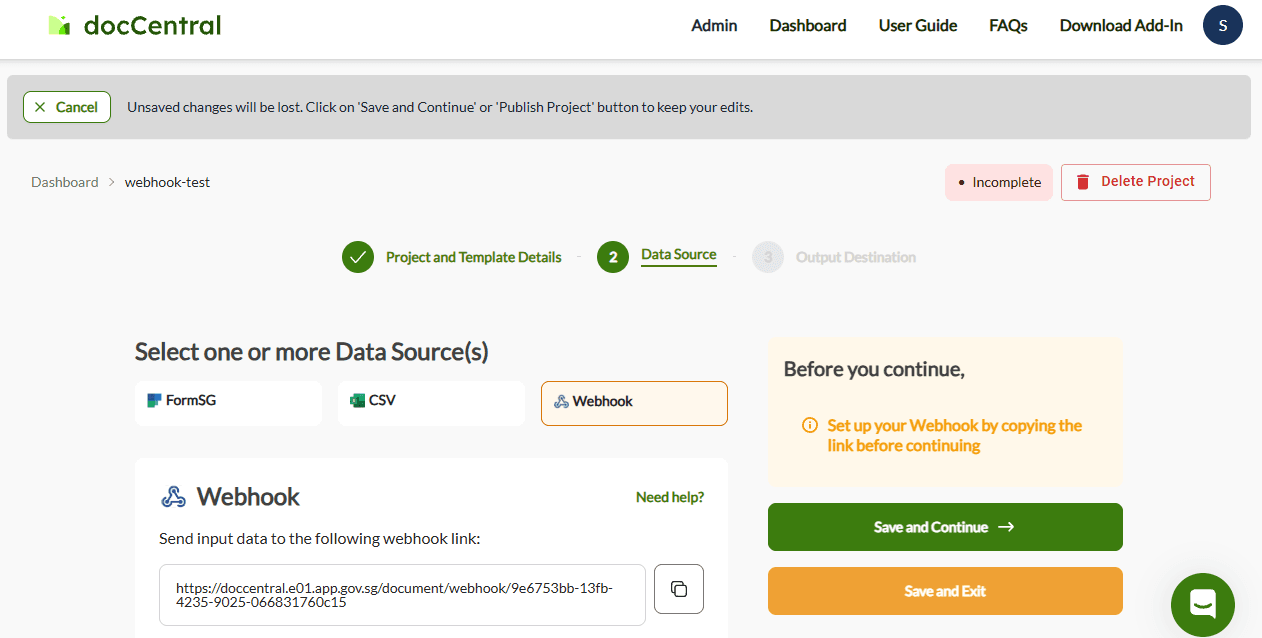
Step 2: Copy the generated Webhook link
Once you have selected webhook as your data source, the system will automatically generate a unique webhook URL for your project. Copy this URL as it serves as the endpoint where you will send your POST request. This URL is specific to your project and should be kept secure.
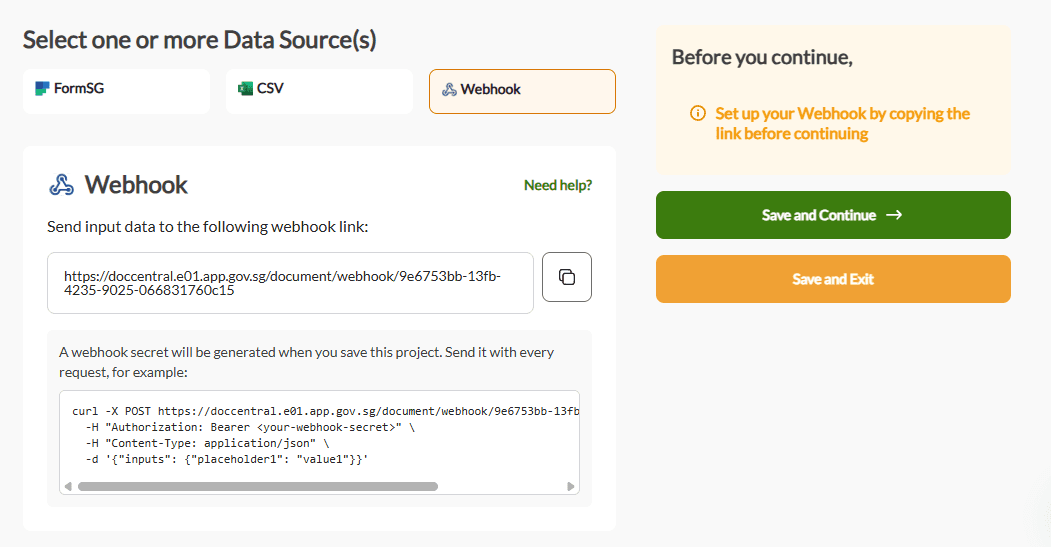
Step 3: Save your project to obtain webhook secret
Upon pressing “Save and Continue” or “Save and exit”, you will receive your webhook secret. This webhook secret is compulsory, and should be set in your request header. Save this secret securely as you will not see the token again.
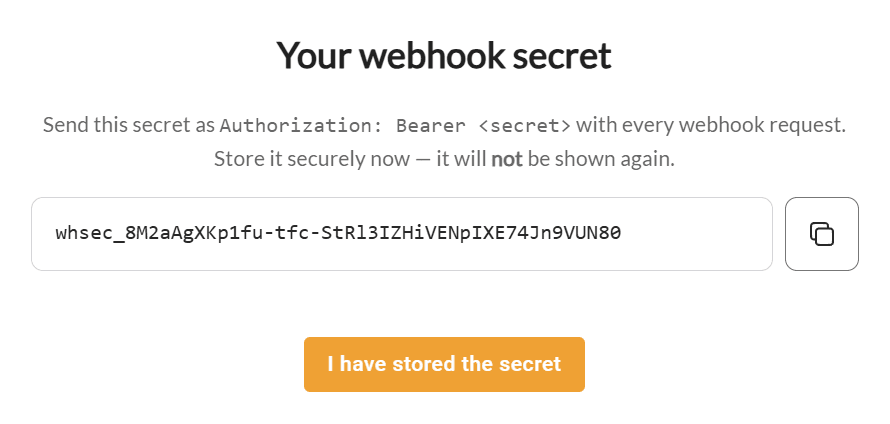
Once you have saved the secret, click “I have stored the secret”.
If you lost your secret, you can regenerate your secret by clicking on “Regenerate secret” and saving your project:
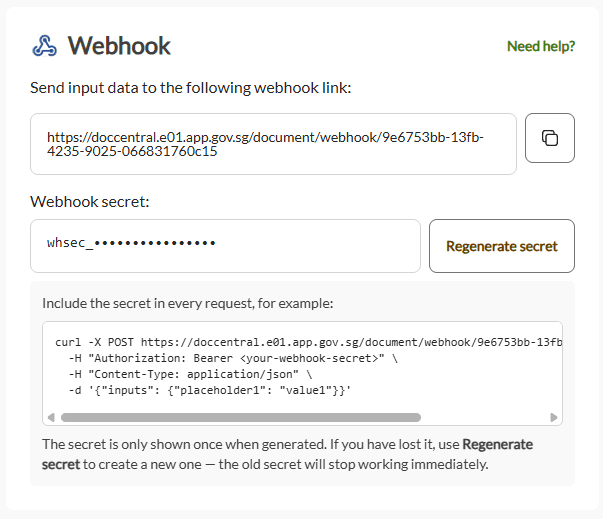
Step 4: Send the input data to this webhook link
Upon completing the project creation process and publishing the project, you can send the input data to the given webhook URL endpoint with the following configurations:
Basic Information
| Field | Value |
|---|---|
| HTTP URL | Obtained from Step 2 |
| HTTP Method | POST |
Request Header
| Field | Value |
|---|---|
Content-Type | application/json |
Authorization | Bearer <secret obtained in step 3> |
Request Parameters
| Placeholder Type | Allowed Data Types | Format / Restrictions |
|---|---|---|
| Short/Long | string | Must not contain $, {, }. For email domains, it has to be in the format: [email protected] |
| Number/Decimal | integer, float | |
| Date | string | See accepted date formats below |
| Signature | string | Format: [email protected] |
| IF Conditional | boolean | true / false |
An example of the request payload is as follows:
{
  "inputs": {
    "short_long": "string1",     // Short/Long
    "number": 1000,              // Number
    "decimal": 100.12,           // Decimal
    "date": "01/01/2026",        // Date
    "signature": "[email protected]",  // Signature
    "if_conditional": true       // IF Conditional
  }
}
Sample CURL request
curl -X POST "https://doccentral.e01.app.gov.sg/document/webhook/2a3b4c5d" \
  -H "Authorization: Bearer whsec_1234567890" \
  -H "Content-Type: application/json" \
  -d '{"inputs": {"placeholder1": "value1"}}'
Sample Response Body
{
  "message": "XXX"
}
If the request is valid, the document will be generated and sent successfully.
Accepted Date Formats
For any Date parameter, ensure the input value follows one of the following formats:
"DD/MM/YYYY", "D/M/YYYY", "DD/MM/YY", "D/M/YY",
"DD MMM YYYY", "D MMM YYYY", "DD MMM YY", "D MMM YY",
"DD MMMM YYYY", "D MMMM YYYY", "DD MMMM YY", "D MMMM YY",
"DD-MM-YYYY", "D-M-YYYY", "DD-MM-YY", "D-M-YY",
"DD-MMM-YYYY", "D-MMM-YYYY", "DD-MMM-YY", "D-MMM-YY",
"DD-MMMM-YYYY", "D-MMMM-YYYY", "DD-MMMM-YY", "D-MMMM-YY"
Errors
Here is a table of the common errors that you might face when filling in the JSON data input. See webhook as an output destination for more errors related to webhook outputs.
| Status Code | Recommended Fix |
|---|---|
201 - Created | Document generated successfully — no action needed. |
400 - Bad Request | • Ensure that your project is published and that you have pasted the webhook URL from the copy step correctly. • Ensure that the input date follows one of the accepted date formats. • Ensure that input emails follow the format [email protected].• Ensure that all signature placeholder parameters are filled. • Ensure that Short/Long inputs do not contain $, {, }.• Ensure that the request body fulfils the required format. |
401 - Unauthorized | • Verify the authentication method. • Ensure that the credentials are correctly configured in the webhook settings. |
403 - Forbidden | • Ensure that your IP address is allowed to access the webhook endpoint. |
404 - Not Found | • Ensure that the endpoint URL is correct as generated in the copy step. • Ensure that the endpoint starts with https:// and not http:// or ftp://. |
429 - Too Many Requests | Too many requests hit the API too quickly. Please try again later. |
500, 502, 503, 504 - Server Errors | Something went wrong on docCentral. Please try again later. |